


- Manual USAspending checks waste hours confirming nothing changed
- Past ten awards, something reliably gets missed each week
- FedSpend Favorites flags changes without re-checking every award
- Award data still flows from USAspending.gov through FPDS monthly
- Favorites watches known awards; finding new solicitations is separate
Every account manager with more than a handful of federal IT relationships has done this move: open a tab, paste in a PIID, scroll the transaction table, squint at the obligation total, close the tab. Multiply that by a dozen awards, every week or two, for a fiscal year, and you’ve burned days confirming that eleven of them didn’t change.
That’s the quiet failure mode of federal contract account management. You miss a signal not from inattention, but from watching the wrong eleven awards that week. The teams who never miss a federal contract obligation change aren’t the ones with the best memory. They stopped relying on memory and built a system instead.
The Manual Habit Most Account Teams Are Stuck In
Most BD and account teams still track federal award activity by habit, not by system. That means a bookmarks folder of USAspending.gov award pages, a calendar reminder to “check accounts,” and a mental model of which contracts are due for a modification based on when you last happened to look.
| Manual Habit | What It Actually Costs |
|---|---|
| Bookmarking individual award pages | No easy way to compare this week’s pull to last week’s |
| Re-pulling transaction history on a schedule | Time spent checking awards where nothing happened |
| Relying on memory for “it’s about due” | Renewals and ceiling increases noticed late, or missed |
| One person owns the checking cadence | Coverage disappears the week that person is out |
The real cost isn’t the data. USAspending.gov is public and free. The cost is attention spent re-verifying nothing happened, attention that doesn’t scale and never shows up on a timesheet.
Why Manual Tracking Breaks Down Past a Handful of Accounts
Manual monitoring survives at five to ten awards and collapses past that. Below that threshold, checking is tedious but doable. Past it, something always gets missed, and rarely the award you expected.
Part of the problem is structural, not personal. Federal transparency law requires an update every 30 days, so the refresh isn’t continuous or obvious on the page. Nothing pings you when a transaction posts, and federal modifications themselves often take thirty to ninety days to formalize, so a ceiling increase can be moving before it’s visible to a manual checker.
How Favorites Turns a Watch List Into a Monitoring System
Favorites replaces the re-checking habit with a flag that appears only when something actually changed. Inside FedSpend’s Award Data platform, you star an award and it joins a Favorites list. From that point, it’s flagged whenever new transactions post or the obligation total moves.
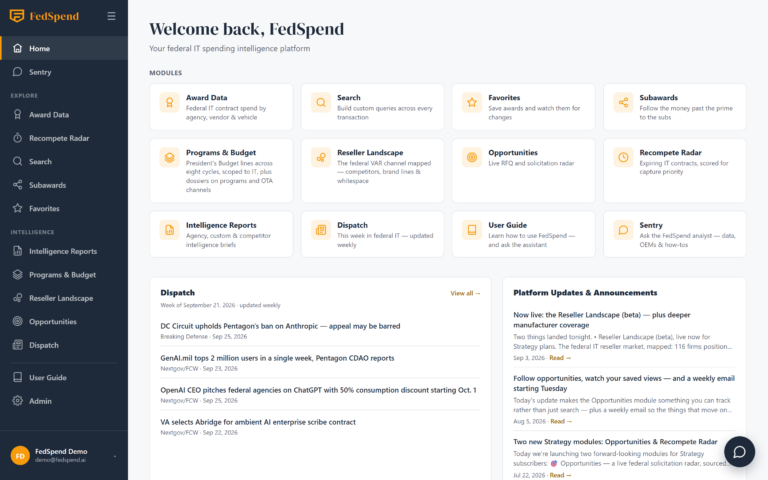
Favorites lives on the Intelligence plan, alongside the other tools built for this kind of ongoing coverage:
Explore federal IT spending patterns free
Start a FedSpend trial to discover growth opportunities in $675B+ of federal IT awards.
| Intelligence Plan Component | What It’s For |
|---|---|
| Award Data | Transaction history, IDV child-order rollup, and award detail by agency, PSC, and NAICS |
| Favorites | Starred awards flagged on new transactions or obligation changes |
| Dispatch | Weekly federal IT news digest covering the broader market around your accounts |
| Intelligence Reports | Published quarterly agency reports, available for every agency |
| Sentry | In-app AI analyst for plain-language questions against live award data |
It’s worth being precise here. The source is still USASpending.gov, pulling from FPDS, refreshed monthly, the same public record anyone can pull by hand. Favorites doesn’t make that record arrive faster. It removes the part where a human has to remember to go re-check it.
A Day-to-Day Workflow for Account Teams Using Favorites
The workflow shift is simple: star once, then let flags do the watching. Picture an account team covering a dozen existing IT IDVs and task orders across two or three agencies, a mix of long-running O&M contracts and IDIQs nearing the back half of their ordering periods.
- Star each award once in Award Data, matching the Favorites list to the book of accounts already under coverage.
- Stop running recurring manual spot-checks against those same awards.
- When a flag appears, open the award detail for transaction history and IDV child-order rollup to see what changed and by how much.
- Use Sentry to ask a plain-language question about the award’s history, instead of parsing raw transaction rows.
- Decide what the change means: a ceiling increase worth a call, or a sign the contract is burning toward a recompete faster than its period of performance suggests.
Worth drawing a line here, because it’s easy to conflate: Favorites watches awards you already have visibility into. It isn’t how you find new solicitations. That’s a separate job, handled by Recompete Radar and Opportunities.
What This Looks Like Across a Real Book of Accounts
At scale, the habit stops being about remembering agencies and starts being about coverage. A BD lead with awards favorited across Air Force, Navy, VA, and DHS accounts doesn’t need to carry each agency’s fiscal-year pattern in their head.
- An award tied to Air Force IT spending gets flagged the same way as one tied to a civilian agency.
- A VA task order shifting toward a different buying pattern surfaces as a flag, not something caught three months late.
- Coverage breadth stops depending on who’s at their desk that week, since the list is doing the watching.
That’s the actual shift: not more data, just less of it depending on someone remembering to look.
Where Favorites Fits in a Broader Monitoring Routine
Favorites covers the awards already on your radar; it’s one layer in a larger routine, not the whole thing. Dispatch handles the weekly federal IT news layer around those accounts, the kind of context a sales rep used to assemble from ten browser tabs. Sentry handles the ad hoc question between flags, when someone needs a quick answer instead of a fresh data pull.
On the Strategy plan, Sentry also answers budget-line questions, useful for teams watching Programs and Budget signals tied to the same accounts, see the plan comparison on FedSpend’s pricing page. None of this replaces the underlying public record. It’s enrichment on data that was always technically available, just never practically watchable by one person checking from memory.
The System Beats the Spreadsheet Every Time
This isn’t a close call. A spreadsheet of bookmarked award pages depends entirely on someone remembering to open it, a bad bet against a fiscal year with a hundred other fires in it. Favoriting an award isn’t a nicer interface on the same manual work. It’s a different question: not “did I check this yet,” but “what changed since I last looked.” For a book of a dozen or more live relationships, that’s the difference between catching a renewal in week one and catching it three months late, after the window to say anything useful has already closed.
