

- Intelligence and Strategy serve different workflows, not feature tiers
- Both plans share Award Data, Favorites, Dispatch, and Sentry
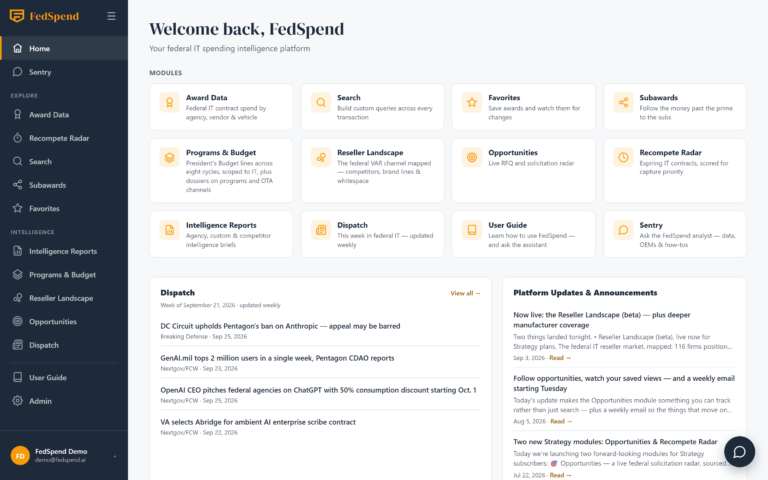
- Strategy adds Recompete Radar, Search, Budget lines, and Opportunities
- Capture cadence — not headcount — determines the right plan
- 14-day trial excludes CSV export on both individual plans
Ask ten federal IT vendors to explain FedSpend’s two pricing plans, and most will guess wrong. They’ll say one is “basic” and the other is “premium,” a watered-down version versus the real thing. That’s not how the split works. FedSpend’s Intelligence and Strategy plans aren’t tiers of the same product — they’re built for two different jobs inside a federal IT sales org. This piece walks through what each plan actually unlocks, which team structure each one matches, and how the 14-day trial lets you test that fit against a real agency or a recompete you’re already tracking, before you talk to anyone.
What Does Every Paid FedSpend Plan Include?
Both FedSpend plans start from the same award-data foundation, then diverge sharply on what sits on top of it. Every paid account — Intelligence or Strategy — includes Award Data scoped strictly to IT spending: obligations by agency, recipient, Product Service Code, NAICS, and contract vehicle, with DoD broken out by component (Navy, Army, Air Force, DLA, DISA). Award detail carries transaction history, IDV child-order rollup, and subaward tabs. Both tiers also include Favorites, Dispatch, agency quarterly Intelligence Reports, Sentry, and Help.
| Feature | What It Does | Included On |
|---|---|---|
| Award Data | IT obligations by agency, recipient, PSC, NAICS, vehicle; DoD by component | Intelligence & Strategy |
| Favorites | Starred awards flagged when new transactions or obligation changes post | Intelligence & Strategy |
| Dispatch | Weekly federal IT digest, The Brief and The Feed, in a Tuesday email | Intelligence & Strategy |
| Intelligence Reports | Published agency quarterly reports | Intelligence & Strategy |
| Sentry | In-app AI analyst answering from live award data | Intelligence & Strategy |
One boundary matters more than buyers expect: the scope is IT spending, not all federal spending. FedSpend follows the OMB/GSA Category Management IT definition — IT NAICS codes and PSCs plus a curated allowlist — so classified spending, OTA member-project dollars, and micro-purchases are structurally invisible by design, not by omission. If your team is mapping which bureau actually controls a given budget line rather than which office merely signed the award, that’s where the decomposition down to the buying bureau becomes the thing you open first, not an afterthought.
Who Is the FedSpend Intelligence Plan Built For?
The Intelligence plan matches a lean BD team that needs to know what’s being spent, by whom, and what’s moving next — without a dedicated capture function to feed. If your week looks like checking a short list of agencies, reading the quarterly reports to catch budget direction, and getting pinged when a tracked award changes, Intelligence covers it.
Favorites plus Dispatch do most of the daily work here. Favorites flags obligation changes on awards you’re already watching; Dispatch delivers the weekly context — curated federal IT news from roughly a dozen sources — so you’re not assembling that picture manually. Sentry on Intelligence answers from live award and agency data, which is enough for a fast lookup before a call but doesn’t drill into budget-line detail.
What the Intelligence Plan Leaves Out
Stated plainly, Intelligence does not include:
- Search and Subawards (cross-agency search operators, PIID lookup, CSV export)
- Programs & Budget (President’s Budget line-level drill-downs)
- Reseller Landscape (VAR competitive positioning)
- Opportunities (live SAM.gov solicitation tracking)
- Recompete Radar (priority-scored recompete timing)
- Commissioned OEM, go-to-market, or reseller competitive reports
If your shop doesn’t run a formal capture process — no recompete tracking cadence, no quarterly pipeline review that consumes competitive data — Intelligence is where you stop, and that’s not a downgrade. It’s a correct read of what your team actually uses day to day, a point the small-business recompete playbook makes well for shops without a full-time BD department.
What Does the FedSpend Strategy Plan Add for Capture Managers?
Strategy is built for a capture org running quarterly pipeline reviews, formal recompete tracking, and OEM or reseller competitive positioning as a discipline, not a scramble. Everything in Intelligence carries over; Strategy adds six things on top.
Explore federal IT spending patterns free
Start a FedSpend trial to discover growth opportunities in $675B+ of federal IT awards.
| Module | What It Shows | Who Uses It |
|---|---|---|
| Search & Subawards | Cross-agency search (AND/OR/exclusion/quoted-phrase), PIID lookup, saved searches, quota’d CSV export | Analysts building target lists |
| Programs & Budget | President’s Budget at R-1/P-1/O-1 line level (Defense) or account level (civilian), O&M contracted-IT drill-downs, OTA Consortium Registry | Capture leads sizing a pursuit |
| Reseller Landscape | Federal VAR market by firm, six closest competitors and gap tabs, manufacturer brand pages | OEM and reseller BD |
| Opportunities | Live SAM.gov solicitations scoped to IT, followed across re-postings, saved alerts | Proposal and shaping teams |
| Recompete Radar | Priority score (0–100) weighing size, timing, contestability across 30/90/180/180+ day windows | Capture managers timing re-entry |
| Commissioned reports | OEM, go-to-market, and reseller reports assigned per customer | Account teams needing confidential analysis |
Search, Subawards, and the Money Past the Prime
Subawards ride on the federal FSRS feed, which means the data follows money past the prime to subcontractors and OEM brands — useful, but worth flagging plainly: subaward reporting is partial and it lags. Treat it as directional, not a complete ledger.
Recompete Radar and Reseller Landscape, Together
Recompete Radar is the module that replaces the spreadsheet most capture teams already keep, scoring contracts by recompete timing instead of eyeballing ordering-period-end dates by hand — including IDV shells, which is where informal tracking usually breaks down. Pair it with Reseller Landscape and you get the two halves of a capture decision in one place: when a recompete window opens, and who’s already sitting in the incumbent’s reseller channel. That pairing is also what the reseller performance tracking approach is built to answer for OEMs trying to see which partners are actually moving product. Sentry on Strategy additionally answers budget-line questions, not just award-level ones.
Where Buyers Get the Intelligence vs. Strategy Call Wrong
Two mistakes show up constantly, and they run in opposite directions.
- Buying Strategy for the commissioned reports alone. A team that signs up for the OEM or reseller reports but has no weekly workflow for Recompete Radar or Reseller Landscape is paying for analysis it reads once and shelves.
- Staying on Intelligence while running an informal recompete spreadsheet. If that spreadsheet is already tracking ordering-period-end dates and contestability by hand, Recompete Radar isn’t an upgrade — it’s the tool replacing unpaid analyst labor, a gap the capture-strategy framework for stopping the guesswork covers in more detail.
The real decision point isn’t team size. It’s whether your team runs a repeatable capture cadence that actually consumes budget-line and competitive data every cycle — or whether it runs on award visibility and agency awareness. Size is a proxy; cadence is the fact.
How Does the FedSpend 14-Day Free Trial Work?
The 14-day trial is available on both individual plans — Intelligence and Strategy — with a card required at signup and no CSV export during the trial window. Team plans are billed per seat at signup and carry no trial at all, which is worth knowing before you loop in a manager expecting to test-drive a group account.
Fourteen days is enough time for one concrete test, not a broad survey. Two ways to use it well:
- Pull a target bureau’s agency quarterly report end to end and see whether the budget narrative matches what you already know from the field.
- Run a recompete you’re already tracking through Recompete Radar’s windows and check its priority score against the timing you expect.
Set your expectations on refresh cadence correctly: award and budget data update monthly, while Opportunities and Recompete Radar refresh several times a day. “Live” means something different depending on which module you’re looking at, and that distinction matters if you’re timing a trial around a specific solicitation.
Match the Plan to the Process, Not the Headcount
Intelligence buys award visibility and agency awareness for a team that doesn’t yet run formal capture. Strategy buys recompete timing, subaward trails, and OEM-reseller positioning for a team that does. If you’re also weighing this against other spend-intelligence tools, the FedSpend-versus-GovSpend pricing breakdown is the adjacent read. But the fastest way to settle it isn’t another feature table — it’s fourteen days against a recompete you already know the answer to.
